

AI customer service and conversion: 4 drop-off fixes | Alta.DI
97% of visitors do not buy, but some of them are one answer away from buying. This article breaks down 4 drop-off moments, 4 AI customer service designs and 3 metrics to track after launch. Book a free 30-minute service gap diagnostic.


The role of AI customer service in conversion rate optimization is to step into the conversation during the few seconds when a visitor hesitates, moving browsers who are "one step from leaving" toward completing an action. It suits online scenarios that need an immediate response, such as e-commerce, B2B websites and service bookings.
Your conversion funnel may have a hole in the middle
97% of visitors do not buy, but some of them are one answer away from buying
The effect of AI customer service on conversion rate rests on filling the service gap where "a visitor has a question but cannot find an immediate response." Ads bring people in and landing pages make them want to stay, but neither layer answers the specific question in the visitor's head.
Picture this: it is 9:30 on a Friday night, and you open the GA4 real-time report to see 87 active visitors on your website. Someone has paused on the pricing page for 40 seconds, someone added a product to the cart and removed it, and someone scrolled back and forth on the specifications page three times. But there is not a single conversation in Livechat. What were these people thinking? Why did they leave without asking anything?
Several industry benchmark reports put the average conversion rate of e-commerce sites worldwide at 2-3% [1]. Among the 97% who did not buy, most really were just browsing, comparing prices or not your target customers at all. But Zendesk's 2026 CX trends report found that 63% of consumers rank "speed of response" as the single most important factor in the service experience, ahead of speed of resolution (57%) [2]. That means within the 97%, some people came with purchase intent. They wanted to buy, but got stuck at a key moment, and nobody on your website caught them.
When conversion is low, most companies respond by increasing the ad budget or redesigning the landing page. Both help, but both overlook a third layer:In the few seconds a visitor hesitates, does your website have a way to talk in real time?
A 2018 Forrester comparison shows that visitors who used live chat converted at 2.8 times the rate of those who did not [3]. This compares users who "had a conversation vs did not," and does not directly mean you will get the same multiple after adoption, but the direction is clear: when someone catches visitors as they hesitate, conversion really is higher. Compiled data from 2026 echoes this direction: after a website adds live chat, overall conversion rate rises by about 20% on average [4].
It is not only academic research that says this. Enterprise surveys point to the same trend. After surveying 265 customer service leaders in 2025, Gartner predicted that live chat and self-service will overtake phone and email by 2027 as the most valuable customer service technologies for companies [5].
This article breaks down exactly this: how many people in your website traffic could be caught, where the gaps are, and how AI customer service can be designed so that the situation of "traffic but no orders" is fixed systematically.
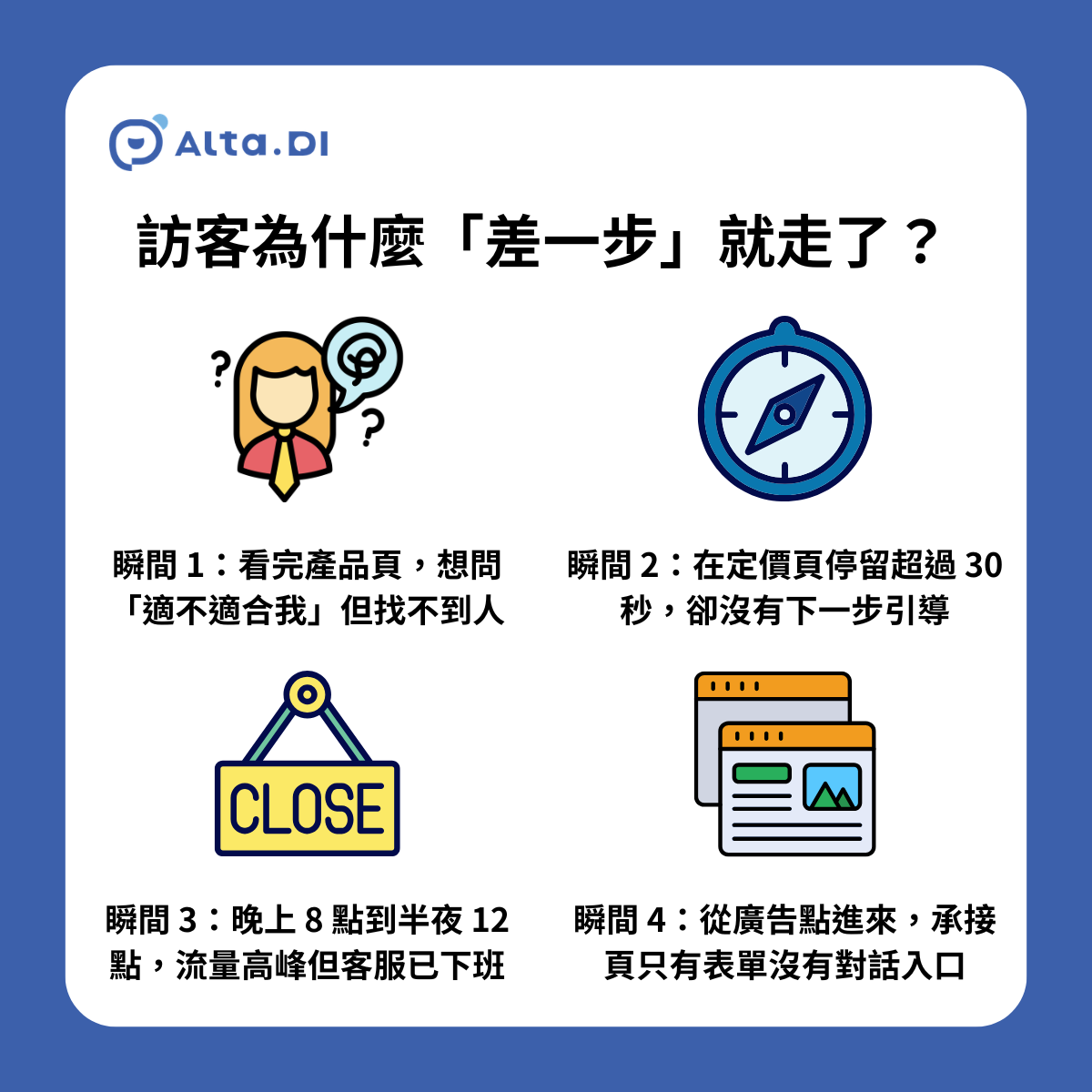
Why do visitors leave "one step short"? The 4 most common drop-off moments
Visitors with purchase intent do not disappear for no reason. They get stuck at specific moments
Not every visitor who leaves is worth winning back. But some clearly came with purchase intent: they stayed a long time, viewed many pages, and even added to the cart, yet never completed checkout. These visitors are usually lost at very specific pages and seconds, and there are traces to follow.
The four moments below are the drop-off situations we observe most often when we help customers adopt AI customer service.
Moment 1: after reading the product page, they want to ask "is it right for me?" but cannot find anyone
The visitor has already spent 2-3 minutes reading the product specifications, and what comes to mind is usually not "is this good?" but "is this right for my situation?" For example: "My shop has only two people. Would this system be too complicated?" "We have both a website and Shopee. Can this integrate with both?"
An FAQ cannot answer this kind of question, because everyone's "situation" is different. If the page has only a static form at this point, the visitor's next step is usually to open another tab and search for competitors.
Moment 2: staying on the pricing page for more than 30 seconds with no next step offered
The pricing page is the last push in the conversion funnel. A visitor who stays more than 30 seconds is not admiring your layout. They are doing the math. They want to know "which plan fits my size," "does this price include implementation," and "is there a trial period."
If they have to piece these answers together from the page, or fill in a six-field contact form to ask, there is a high chance they simply leave. The problem is not the form but the speed. After they submit, if they wait a day or even three, the urge to buy has long faded. Industry statistics for 2025-2026 also show that conversational conversion rates average 10-20%, while traditional website forms convert at only 2-3% [6].
Moment 3: 10 p.m. to midnight, the peak for placing orders, but customer service has gone home
Shopee's statistics show that Taiwanese consumers are most likely to place orders between 22:00 and 24:00 [7]. Purchase intent is strongest in this window, but most companies' service teams have already gone off duty.
This window has another feature: it is almost all mobile. Statistics for 2026 show that 73.6% of live chats happen on mobile devices, and visitors who opened a chat on mobile were 6.1 times as likely to convert as visitors on mobile who had no chat, a bigger gap than on desktop [8]. The reason is not hard to understand: mobile users have usually reached the later stage of the decision before they reach out to ask someone.
An operations manager once told us that when he opened the LINE back office on Monday morning, he found a dozen visitors had asked simple questions the night before, such as "Is it in stock?" and "How much is shipping?" With no one replying, a few of those orders had already appeared at a competitor. All of this was traffic that had been paid for with ad costs.
This is purely a timing gap: your traffic peak and your service capacity are not on the same timeline.
Moment 4: clicking in from an ad, the landing page has only a form and no way to talk
You spent ad budget to bring the visitor in. They clicked through to the landing page with clear interest, but what they see is a block of marketing copy and a form saying "leave your contact details and we will contact you as soon as possible."
The problem is that "as soon as possible" may mean tomorrow, and in 10 minutes this visitor may be taken by another ad to a competitor's site. What live chat can do is more than "respond quickly." It lets the visitor enter a conversation at the moment of highest interest, get an answer and make a decision.
What these four moments have in common:The visitor's question is not hard, but they need it answered "now." If it slips past that day, this person probably will not come back. The point of AI customer service is to make "now" possible, without being limited by business hours or staffing schedules.
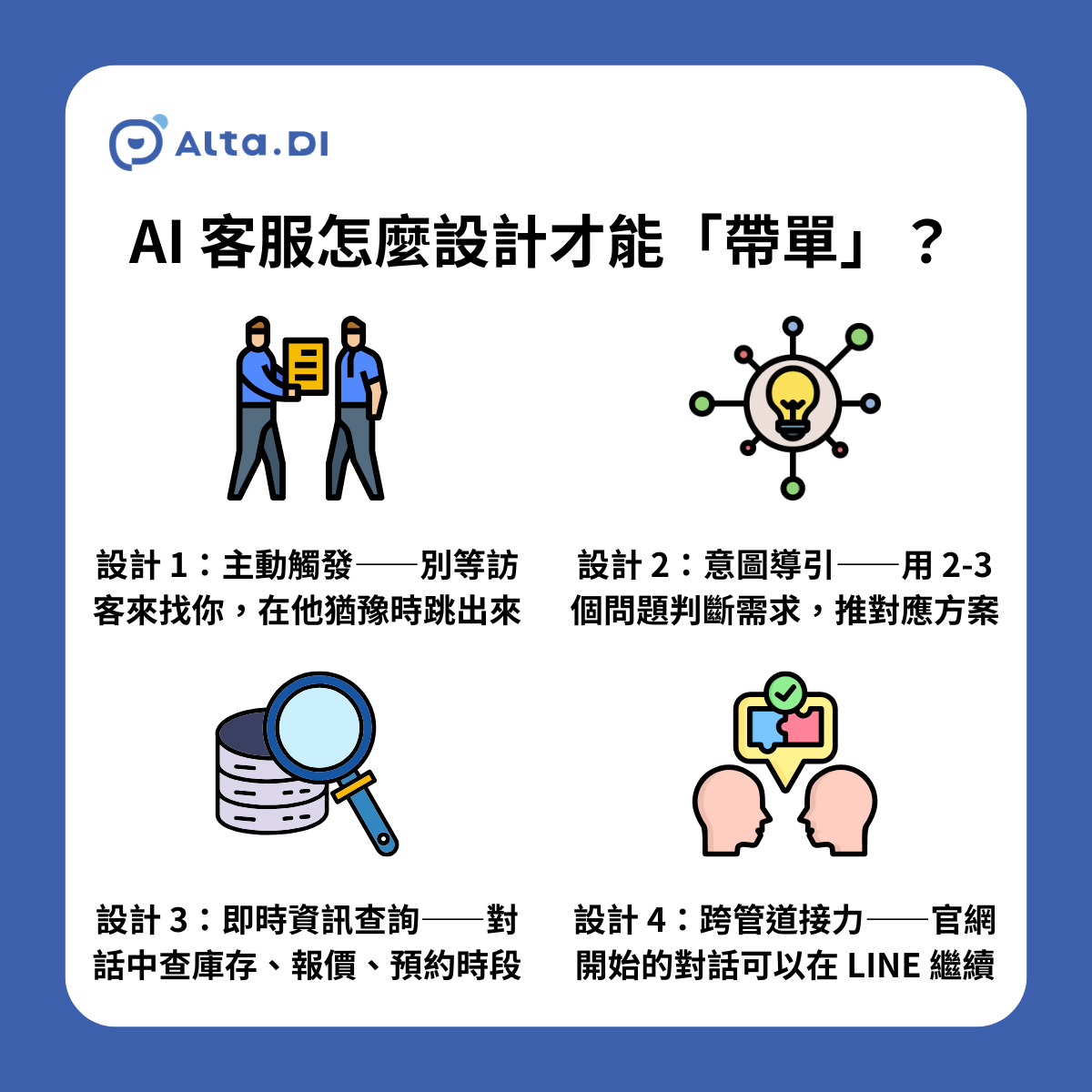
How should AI customer service be designed to "bring in orders" and not just "answer questions"?
From passive reception to active intercept: four designs that let AI customer service take part in conversion directly
For AI customer service to contribute materially to conversion rate, high accuracy is not enough. The key is whether it can step into the visitor's decision process at the right moment and in the right way, turning passive "waiting for someone to ask" into active "catching them when they hesitate."
The four designs below are the core differences that turn AI customer service from a "service tool" into a "conversion engine."
Design 1: proactive triggers. Do not wait for visitors to find you; step in when they hesitate
The logic of traditional customer service is "come to me if you have a question." The logic of conversion-oriented AI customer service is "it looks like you may be stuck. Can I help?"
In practice, you set trigger conditions based on visitor behavior. For example: when a visitor stays on the pricing page for more than 25 seconds, pop up "Would you like help comparing which plan fits you?"; when a visitor scrolls to the product specifications area and back up, show "Any questions about the specifications? I can help clarify." In Alta.DI's Workflow feature, these trigger conditions can be set in three steps, "trigger → condition → action," and opening a specific page, staying longer than a set number of seconds, or adding to the cart without checking out can all serve as trigger points. The back office has 25 built-in Workflow templates, 15 of which are dedicated to guided-selling conversion, such as abandoned checkout discounts and Shopify add-on reminders, so you do not have to design from scratch.
Industry case studies show that well-designed proactive triggers (dwell-time prompts, cart-exit retention) can bring up to a 30% conversion increase, and specific funnels with good tuning reach 30-45% [9]. What matters is the timing and tone of the trigger: pop up too early and it feels like a sales pitch, too late and the person has already left.
Design 2: intent guidance. Use 2-3 questions to judge the need and suggest the matching plan
Many companies set up their AI customer service as "answer whatever is asked," but the approach with higher conversion is the reverse:The AI proactively asks 2-3 questions to judge the visitor's need, then recommends the matching product or plan.
For example, on a B2B software website, the AI opens by asking "Roughly how many people on your team handle customer service now?" → "What tool do you use to manage it now?" → based on the answers, it recommends "Your situation suits plan X better, and here is a detailed comparison."
This is not speculation. Alta.DI actually works this way: a visitor entering the site first meets Flow Bot, which uses button options to quickly clarify needs, such as "I want to compare plans" or "I want to check an order." Open-ended questions are taken over by the AI Bot, which finds answers in the knowledge base. Only complex situations that truly need judgment go to a human agent. The three layers each have a role, so visitors do not wait and service staff do not handle repeated questions. Combined withmarketing automation features, personalized follow-up messages can also be sent automatically after the conversation ends.
Design 3: real-time information lookup. Check stock, quotes and appointment slots within the conversation
When a visitor asks "Is this in stock?" or "Any open slots next Wednesday afternoon?", if the AI can only reply "Please wait while I transfer you to a person to confirm," the conversation has effectively not been completed.
AI customer service that can really bring in orders must be able to pull back-office data during the conversation, such as stock quantity, order status and bookable slots. Order and product data from e-commerce platforms fall within the standard integration scope, while a company's own systems need a consultant to assess the integration method. The answer changes from "let me confirm for you" to "we have 12 sets in stock now, and an order today arrives tomorrow."
We have worked with a Taiwanese freight consolidation company that handled hundreds of customer messages a day from LINE, IG and Messenger, with customers waiting over 30 minutes on average. After adopting Alta.DI and completing system integration assessed by a consultant, when a customer asked "Where is my package?", the AI queried the logistics API in real time and replied with progress; when asked "How much to ship 5 kg to Japan?", the AI calculated the shipping fee automatically. The result was a 45% faster response, with the AI independently handling 75% of customer questions, and human agents needed only for complex cases that call for judgment [10].
Design 4: cross-channel relay. A conversation started on the website can continue on LINE
There is a very common scene in Taiwan: a visitor browses your website on a computer, and halfway through the conversation they need to head out, so they habitually open LINE. If they then look for you on LINE and have to describe the problem from the start, the conversion value of that conversation is broken.
Omnichannel integrationin AI customer service makes this possible: a conversation a visitor starts in the website Livechat has its record synced to channels such as LINE, Facebook, Instagram and email (WhatsApp is supported from the advanced plan upward). Whichever channel they come back on, the AI can continue from the earlier context. Alta.DI's customer service workstation brings messages from all channels into one interface, so service staff do not have to switch between several back offices and do not miss messages.
Taken apart, the four designs each have their own function. Chained together, the effect is that between a visitor entering and leaving the site, every sticking point has a conversation layer to catch them. It does not wait for them to ask; it appears when they are stuck.
How do you measure AI customer service's contribution to conversion? 3 metrics to track
Do not only look at "whether people use it." Look at "whether they buy after using it."
You have adopted AI customer service and run it for a month, and your boss asks how it is going. What number do you answer with? Saying "how many conversations were handled each day" is not enough. High volume does not mean high conversion; there may simply be many questions. The three metrics below are the core basis for judging whether AI customer service is helping you earn.
Metric 1: conversation trigger rate. How many visitors opened a conversation?
The definition is simple: number of visitors who opened a conversation ÷ number of website visitors in the same period.
This number reflects whether your trigger design is good enough. If the trigger rate is below 2%, most visitors did not notice it or were unwilling to talk to your AI. The trigger timing may be wrong, the opening tone too stiff, or the button placement overlooked.
Sites with proactive trigger design usually have a clearly higher trigger rate than those that only place a small icon in the bottom right corner. Among the e-commerce customers we have worked with, after adopting proactive triggers the website inquiry rate rose 35% on average, while the website bounce rate fell 32% at the same time [10].
Metric 2: post-conversation conversion rate. After a conversation ends, how many people actually order or leave an inquiry?
This is the most important metric: among visitors who opened a conversation, how many ended up completing the goal action you defined (placing an order, filling in a form, booking a demo, adding to cart).
If your site-wide conversion rate is 2% and the conversion rate of "visitors who opened a conversation" is 6-8%, the gap is worth noting. Keep in mind, though, that visitors who open a conversation on their own already have stronger purchase intent, so you cannot attribute the whole gap to the conversation itself. Forrester's comparison benchmark of 2.8 times, and 6.1 times on mobile [3][8], can be used to compare against where you land and to see whether the trend is consistent.
Tracking this metric requires connecting the chat system with your website analytics tool (such as GA4) through events, so that "opening a conversation" becomes a trackable event followed by conversion goals.
Metric 3: share of after-hours conversions. How many sales did the AI bring in after human agents went off duty?
As mentioned earlier, Shopee's order peak is 22:00 to 24:00, but most service teams go off duty at 18:00.
This metric looks at how many inquiries, bookings or direct sales AI customer service produced during the hours when human agents are off duty. Among customers who have adopted Alta.DI, the overnight automatic resolution rate reaches up to 85% [10]. If this number goes from zero to a dozen or so a month, the ROI of AI customer service is clear. It lets you catch overnight visitors who would have been lost, without adding staff.
How to track it: in Alta.DI's AI report feature, filter by time range for conversations that were "handled independently by AI and ended in conversion." Under chat analytics in the back office there are session statistics, with dozens of metrics including valid sessions, drop-off rate, first response within 30 seconds and first-response target rate, which can be filtered by date, channel, language and source. Among them, "bot handled independently" records the share of conversations the AI handled from start to finish without handing over to a human, across all hours. To look at after-hours contribution alone, you need to cross-check it with a time filter.
The logic that connects the three metrics:Trigger rate shows "whether you reached visitors" → post-conversation conversion rate shows "whether it moved forward after reaching them" → after-hours share shows "whether the AI filled the gaps when staff were away." Only by looking at the three numbers together can you tell whether AI customer service is helping you earn, or just answering questions.
If you want to track how these numbers relate to customer satisfaction more systematically, see our summary offive customer experience metrics, which has a fuller CX measurement framework.
Conclusion
A conversion rate problem does not always have to be solved with more ad budget.
Often your traffic is already enough and visitors are interested. They just could not find anyone to ask a simple question during one key 3-second moment, and then left. Fixing this gap does not require redesigning the website or doubling ad spend. What you need is a real-time conversation layer that catches the right person at the right time.
If you are not sure how many people in your website traffic are being lost this way, Data-DI offers a free 30-minute service gap diagnostic, in which a consultant reviews your current visitor journey, finds the most critical drop-off moments and suggests where you can make quick fixes. You do not need to prepare data in advance. Just tell us your website address and the customer service tools you use now.
References

[1] Contentsquare (2026.01). Digital Experience Benchmarks 2026. Contentsquare.
https://contentsquare.com/guides/digital-experience-benchmark/conversions/
— Average global e-commerce conversion rate falls in the 2-3% range.
[2] Zendesk (2025.11). CX Trends 2026. Zendesk.
https://cxtrends.zendesk.com/
— 63% of consumers rank response speed as the most important factor in the service experience (resolution speed 57%, channel availability 49%); 88% of consumers think responses in 2026 should be faster than a year earlier.
[3] Forrester Research (2018.03). Retailers Without Chat: A Missed Opportunity. Forrester Blogs (Kate Leggett, 2018-03-27).
https://www.forrester.com/blogs/retailers-without-chat-a-missed-opportunity/
— Live chat users are 2.8 times as likely to convert as non-users. ⚠️ The data is from 2018, but it is still the original source cited across the industry for this number (2026 statistics articles from Tidio, Help Scout, ICMI and others all trace back to it), and there is currently no updated version to replace it.
[4] Ringly (2026.06). 45 Live Chat Statistics for 2026. Ringly.io.
https://www.ringly.io/blog/live-chat-statistics-2026
— Vendor-compiled data shows that adding live chat to a website raises overall conversion rate by about 20% on average.
[5] Gartner (2025.08). Gartner Survey Finds Self-Service and Live Chat Will Surpass Traditional Channels as Top CustomerService Technologies By 2027 (published 2025-08-27). Gartner Newsroom.
https://www.gartner.com/en/newsroom/press-releases/2025-08-27-gartner-survey-finds-self-service-and-live-chat-will-surpass-traditional-channels-as-top-customer-service-technologies-by-2027
— Survey of 265 customer service and support leaders in April-May 2025.
[6] Which-50 (2026.06). Chat-to-Conversion Rate Statistics By Industry. Which-50.
https://which-50.com/chat-to-conversion-rate-statistics-by-industry/
— Conversational conversion rate averages 10-20% in 2025-2026, versus 2-3% for traditional website forms; e-commerce shows the largest increase, and B2B SaaS and professional services are about 20-30%.
[7] Shopee (2019.02). Shopee releases "2018 Consumer Data Survey," revealing big differences in online shopping behavior between north and south (in Chinese). TechNews (Keji Xinbao) (published 2019-02-19).
https://technews.tw/2019/02/19/shopee-2018-consumer-data-survey/
— Taiwanese consumers are most likely to place orders between 22:00 and 24:00, followed by the weekday lunch break from 12:00 to 14:00. ⚠️ The data is from 2018 consumer data, and there is currently no updated version.
[8] Tidio (2026.02). 23 Essential Live Chat Statistics You Should Know in 2026. Tidio.
https://www.tidio.com/blog/live-chat-statistics/
— 73.6% of live chats happen on mobile devices; mobile chatters are 6.1 times as likely to convert as mobile visitors who did not chat.
[9] Reve Chat / BoldDesk case study (2026.05) (cross-checked via a 99coupons compilation).
https://blog.99coupons.ai/live-chat-statistics
— Well-designed proactive triggers (dwell-time prompts, cart-exit retention) can raise conversion rate by up to 30%, and specific funnels with good behavioral tuning reach 30-45%.
[10] Source: Alta.DI product specifications and customer implementation results (2026.07) (Data-DI internal material).
https://www.data-di.com/alta-di
— Includes a Taiwanese freight consolidation company case (45% faster response, AI handling 75% of questions), combined e-commerce customer results (inquiry rate up 35%, bounce rate down 32%, cart recovery up 38%), and platform-level quantified benefits (overnight automatic resolution rate up to 85%, human agent hours saved by more than 40%). ⚠️ Customer results vary by industry and implementation scope, and when cited externally they are reference values from actual results, not commitments.
[11] Intercom (2026.05). Customer Service Trends 2026. Intercom (cited via a 99coupons compilation).
https://blog.99coupons.ai/live-chat-statistics
— Pure AI conversations CSAT 4.1/5, human agents 4.3/5; after adopting a hybrid handoff flow the gap narrows to 0.05 points.
FAQ
FAQs about this article
Which should come first, AI customer service or landing page optimization?

They address different layers. Landing page optimization addresses "is the page attractive enough," while AI customer service addresses "can visitors get an immediate response when they have questions." If the bounce rate is high but dwell time is also long, visitors are interested but stuck, and AI customer service has the higher priority.
How long does it take to see a change in conversion rate after adopting AI customer service?
Alta.DI's standard implementation takes about 4-6 weeks: needs diagnosis, module configuration and knowledge base setup, testing and training, and go-live. Changes in conversion rate usually start to appear in the 2-4 week tuning period after launch, with consultants working alongside you throughout.
Could AI customer service interfere with the visitor experience?
Yes, if it is poorly designed. The most common mistakes are popping up a chat on every page, a tone like a salesperson, and asking too many questions. A good trigger design steps in only when signals show the visitor is "stuck," and the opening tone is "need a hand?" and not "order now for 20% off."
Is AI customer service also suitable for small e-commerce stores to improve conversion?
Yes, and the effect may be more visible. Large e-commerce companies have a full service team on shifts, while small stores usually have one or two people who must mind the shop, ship orders and answer messages at the same time. AI customer service solves the problem of "not enough people." While you pack parcels, the AI catches visitors on your website who are hesitating.
What if the AI customer service answers wrongly? Will it make customers trust us less?
With an enterprise-grade RAG architecture, the AI answers only from the knowledge base you upload, and hands over to a human automatically when its confidence is not high enough. Intercom's 2026 research shows pure AI customer service satisfaction at 4.1 and human agents at 4.3, but with a handoff mechanism the gap narrows to 0.05 points [11].
More articles


訂閱我們的電子報
每月 8 日定期發送最新趨勢與實用資訊!